
Helping Kids Beat Screen Time Addiction in the Age of Meta Limits

A child does not have to throw a tantrum over a phone for screen time to become a problem. Sometimes it looks quieter than that: a child who cannot settle without a device, sneaks extra minutes at night, loses interest in hobbies, or feels anxious when an app is taken away.
Recent legal pressure around Meta and youth social media has pushed the issue into the open. Courts, lawmakers, schools, and parents are all asking the same question: what are these platforms doing to kids? Meta has added more limits and parental tools for younger users, including tighter privacy settings and more controls for families. Those steps matter.
But they do not replace parents.
Screen time addiction is a real thing in the sense that many children can develop compulsive patterns around games, videos, chats, and social feeds. The apps are designed to hold attention. Kids are still building impulse control. That combination can turn “just five more minutes” into a daily battle.
The goal is not to panic or ban every screen. Screens are part of school, friendships, entertainment, and modern life. The goal is to help kids build a healthier relationship with technology before the habit starts running the household.

Meta limits help, but they are only one layer of protection
Tech companies have started adding more safety features for young users. Depending on the platform, these can include teen privacy defaults, time reminders, parental supervision tools, content filters, and limits on who can contact a child.
These tools are useful. They can reduce exposure to strangers, late-night scrolling, and some harmful content. They also give parents a starting point for conversations.
Still, built-in limits have gaps.
A child may use more than one app. They may switch devices. They may watch videos through a browser instead of an app. They may use a friend’s phone. They may learn how to bypass settings. Some children are not trying to be sneaky, either. They are simply following the pull of a system built to keep them engaged.
That is why parental involvement matters more than any single platform rule.
A good way to think about Meta limits is this: they are seat belts, not driving lessons. A seat belt helps reduce risk, but a child still needs an adult to teach judgment, boundaries, and self-control.
Parents can start with a simple audit:
Which apps does the child use most?
What time of day causes the biggest fights?
Does screen use interfere with sleep, school, meals, chores, or friendships?
Does the child hide use or lie about it?
Is the device helping them connect, create, and learn, or mostly helping them avoid boredom?
The answers matter more than the raw number of minutes. Two hours spent making a video project, talking to cousins, or practicing math is different from two hours of endless short clips before bed.
Time matters, but behavior change tells the bigger story.
Watch for signs that screen use has crossed a line
Many kids love screens. That alone does not mean addiction. A child who enjoys games or videos may still stop when asked, sleep well, do homework, play outside, and keep up with family life.
The concern grows when screens begin to crowd out everything else.
Common warning signs include:
Big emotional reactions when a device is removed
Loss of interest in sports, reading, art, toys, or time with friends
Sneaking a device into bed or waking up to check it
Falling grades or rushed schoolwork due to screen use
Constant bargaining for more time
Hiding apps, clearing history, or using another person’s device
Mood changes after social media use
Trouble sleeping after nighttime scrolling or gaming
Feeling unable to stop, even after saying they will
One sign does not prove a serious problem. Patterns do.
Parents should also look at what the screen is doing for the child emotionally. Is it entertainment, or is it escape? A child who reaches for a device every time they feel lonely, stressed, bored, or disappointed may need help building other coping tools.
This is where calm observation helps. Instead of starting with “You are addicted to your phone,” try:
“I notice it has been really hard to stop lately.”
“You seem upset after using that app.”
“Bedtime has gotten harder since the tablet moved into your room.”
“Let’s figure out what this app is giving you and what it is taking away.”
That kind of language lowers defensiveness. It also teaches a key lesson: the problem is not that the child is bad. The problem is that the habit is getting too powerful.
The most useful question is not “How do I take the phone away?” It is “What skill does my child need so the phone has less control?”
This post is for general information only. If a child shows severe anxiety, depression, self-harm talk, extreme anger, or major changes in sleep or eating, it is best to contact a pediatrician or licensed mental health professional.
Build family rules that are clear, boring, and repeatable
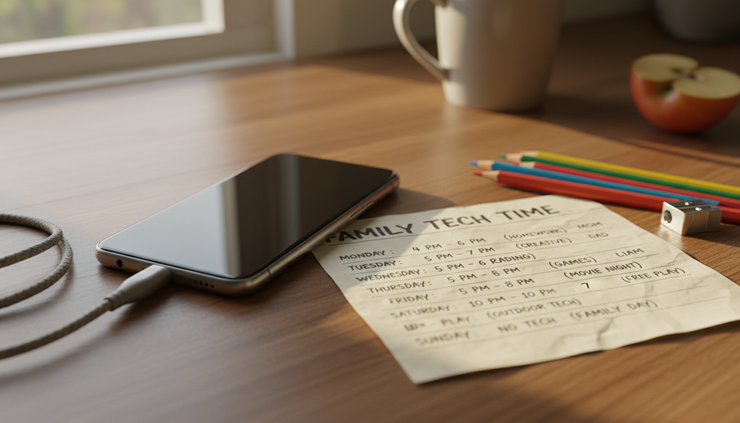
The best screen rules are not dramatic. They are clear, boring, and repeatable.
If every limit becomes a negotiation, kids learn to argue until adults get tired. If rules change based on a parent’s mood, kids feel treated unfairly. A simple family plan removes some of that tension.
Start with the biggest pressure points. For many families, those are mornings, homework time, meals, and bedtime.
A strong starter plan might look like this:
Screen situation | Family rule |
Before school | No entertainment screens until dressed, fed, and ready |
During homework | Device stays away unless needed for the assignment |
Meals | No phones or tablets at the table |
Bedrooms | Devices charge outside bedrooms overnight |
Weekdays | Entertainment time happens after responsibilities |
Weekends | Longer use is allowed, but still has a stop time |
The exact rules can differ by age. A 6-year-old needs different limits than a 15-year-old. Younger children need more direct control. Older kids need more coaching and shared decision-making.
The key is to make rules visible. Write them down. Put them where everyone can see them. If possible, set the same basic expectations for adults too. Children quickly notice when parents say phones are a problem while scrolling through dinner.
That does not mean adults can never use devices. It means adults should name what they are doing.
“I’m checking the weather.”
“I’m answering a message from Grandma.”
“I’m setting a timer, then I’m putting this away.”
That small narration teaches intentional use. It shows that the screen is a tool, not the boss.
For younger children, use physical cues:
A basket for devices during meals
A charging station outside bedrooms
A visual timer
A printed daily routine
A “screen time is done” phrase that stays the same
For older children and teens, include them in the plan. Ask what limits they think are fair. Ask which apps feel hardest to stop. Ask what would help them sleep better or focus more.
Do not hand over full control before they are ready. Do give them practice making choices.
A helpful line is: “More freedom comes with more follow-through.”
That keeps the conversation about maturity, not punishment.
Replace the screen, not just remove it
Taking away a device creates a vacuum. If nothing fills it, boredom and conflict rush in.
Kids often need help remembering what else they like. That may sound strange, but fast digital rewards can make slower activities feel dull at first. Drawing, reading, biking, puzzles, cooking, board games, music, or backyard play may not compete with a feed designed to refresh forever.
The first few days of lower screen time may be rough. That does not mean the plan is failing. It often means the child is adjusting.
Parents can make the shift easier by preparing replacement activities before cutting time.
Good replacements are easy to start:
A basketball by the door
Library books on the couch
Art supplies on the kitchen table
A puzzle left partly finished
Ingredients for a simple snack recipe
A list of friends or relatives to call
A family walk after dinner
A pet care routine
Music practice in short sessions
Chores paired with music or a timer
Kids also need connection. Many screen battles happen when a child wants attention but asks for it through a device. Ten minutes of focused parent time can sometimes prevent an hour of arguing.
That does not require a big plan. It can be tossing a ball, making cocoa, walking the dog, folding laundry together, or asking about the funniest thing that happened at school.
Boredom is not the enemy. In fact, boredom can build creativity. But some children need coaching to move through it.
Try saying:
“You can feel bored. That feeling will pass.”
“Pick one thing from the list and try it for 10 minutes.”
“I’ll help you get started, then I’m going to make dinner.”
“Screens are done for now. You do not have to like the rule, but the rule stays.”
The tone matters. Calm limits work better than long lectures. Kids may still complain, but a steady parent gives the limit more weight.

Teach kids how apps keep them hooked
Children need to understand that their struggle is not just about willpower. Many apps use features that make stopping hard.
These include:
Endless scrolling
Autoplay videos
Notifications
Likes and reactions
Streaks
Random rewards
Short clips that change quickly
Personalized feeds
Explain this in plain language.
“Apps make money when people stay longer. So they are built to keep your attention. That means we have to be smarter than the design.”
This helps kids see the device differently. It is not magic. It is a system.
Once they understand the system, they can learn counter-moves:
Turn off nonessential notifications
Remove the most tempting apps from the home screen
Use grayscale during homework time
Set app limits together
Log out after each use
Keep devices out of bedrooms
Use a timer that rings across the room
Take breaks after one episode or one game round
Parents can also teach children to check in with their bodies after screen use.
Ask:
“Do you feel calm or wired?”
“Do your eyes hurt?”
“Are you more cheerful or more irritated?”
“Was that fun, or did you just keep going?”
“What do you want to do next?”
These questions build awareness. Awareness builds control.
For teens, privacy and trust are part of the balance. They still need limits, but they also need respect. Instead of secretly checking everything, set clear expectations about supervision, safety, and consequences. If monitoring tools are used, be honest about them.
A teen may not love that. Still, honesty protects trust better than hidden surveillance.
Make sleep nonnegotiable
If one screen rule matters most, protect sleep.
Nighttime device use can affect rest in several ways. Bright screens can make it harder to wind down. Fast content can keep the brain alert. Social messages can create stress right when the body needs calm. A child may also stay up far later than intended.
A simple rule helps: devices charge outside bedrooms.
This rule works because it removes temptation during the hardest part of the day. It also avoids repeated arguments after lights out.
Make the bedroom boring in the best way. Keep books, a lamp, stuffed animals, quiet music, or a journal nearby. If a child uses a phone as an alarm, replace it with a basic alarm clock.
The first nights may bring protest. Stay calm. Repeat the reason.
“Your brain needs sleep. The phone sleeps in the kitchen.”
That phrase may sound too simple, but simple rules are easier to enforce.
If a child has been using videos to fall asleep, replace the habit slowly. Try audio stories, soft music, breathing exercises, or reading together. The goal is not perfection on night one. The goal is a steady move toward better rest.
Sleep also improves the rest of the screen plan. A tired child has weaker self-control. A rested child has a better chance of handling limits without melting down.

Keep the plan steady when kids push back
Screen limits often get worse before they get better. That is normal. A child who is used to more access will test the new boundary.
The response should be firm, calm, and short.
Long debates usually feed the conflict. So do threats that parents cannot enforce. Pick consequences that are realistic and directly related to the behavior.
For example:
If the phone is used after bedtime, it charges in the parent’s room for a week.
If homework is skipped for gaming, gaming waits until homework is checked.
If an app causes repeated problems, that app takes a break.
If a child lies about use, trust has to be rebuilt before access expands.
Praise matters too. Notice when a child stops on time, chooses another activity, or tells the truth.
“That was hard, and you stopped anyway.”
“You were upset, but you handed it over. That shows control.”
“You did your routine faster without the tablet this morning.”
These comments help kids see progress. They also shift the story from “my parents are taking things away” to “I am learning self-control.”
Parents should expect to adjust. A rule that works during summer may not work during the school year. A child who handled one app well may struggle with another. A teen may need different boundaries after getting a first phone.
Review the plan every few weeks. Keep what works. Change what does not. Stay focused on the bigger goal: raising a child who can use technology without being controlled by it.
Meta limits and platform safety tools can help. Court cases and public pressure may push companies to do more. That is a good thing. But the most powerful changes still happen at home, in daily routines, repeated expectations, and calm conversations.
Helping kids beat screen time addiction is not about one perfect rule. It is a long series of small choices: charge the phone outside the bedroom, eat without devices, turn off notifications, go outside, talk about how apps work, and try again after a hard day.
A healthier screen life is built the same way unhealthy habits form, one repeated moment at a time. Start with one boundary that protects sleep, school, or family connection. Hold it steady for a week. Then build from there.


Comments